
AI email assistant for valuers It drafts. A person sends.
The assistant reads the email arriving in your shared inbox, sorts it and writes a first-draft reply in your firm’s voice. It has no way to send: a person reads the draft, fills in every highlighted check marker and presses Send. Mailbox connections to Outlook and Gmail are not live yet.
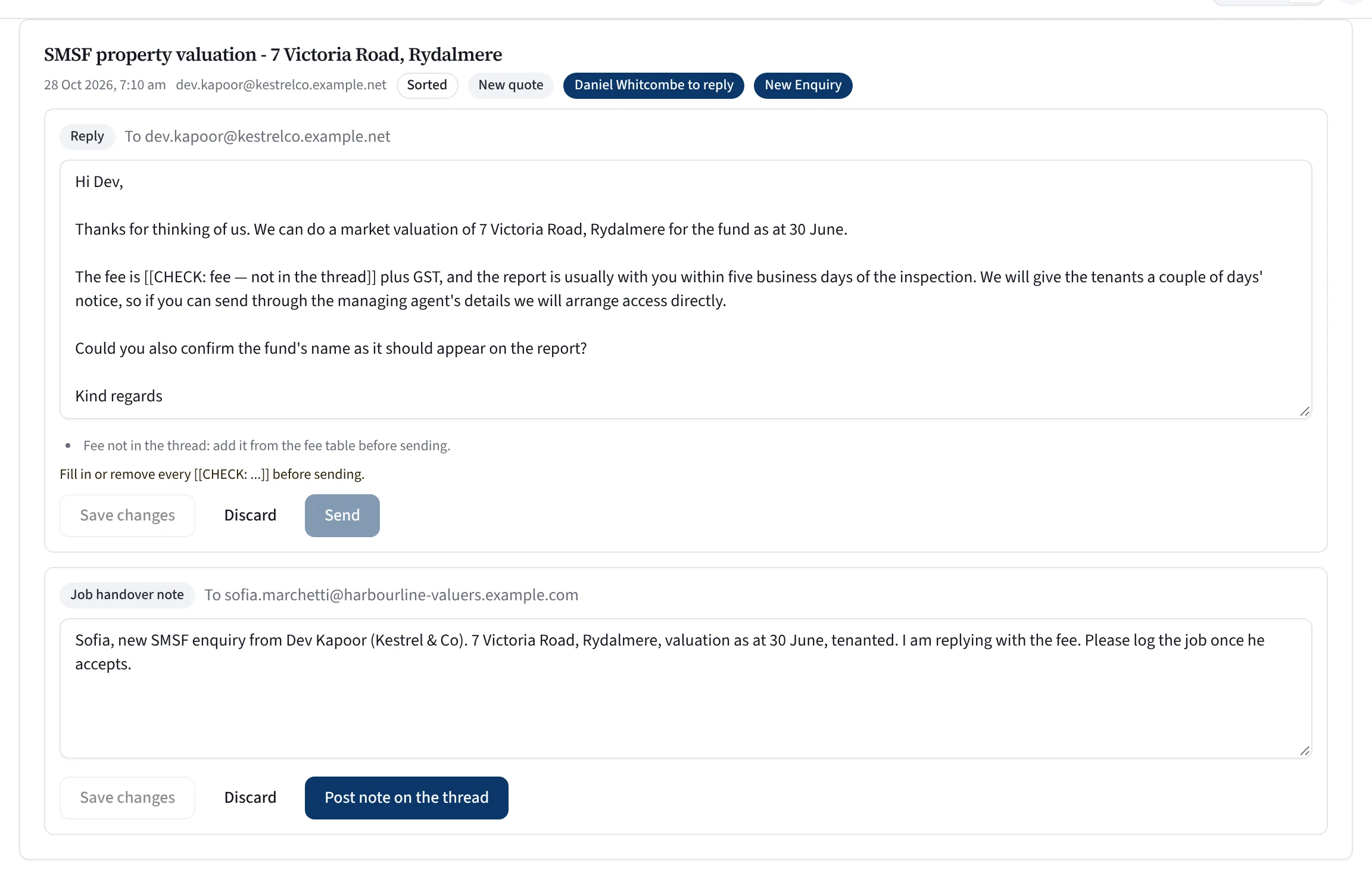
What to look at
- Sorted, tagged and given to a person
- A CHECK marker where a fact is missing
- Send stays shut until every marker is filled
- A handover note for a colleague
A real screen from Valufield, shown with an invented firm. Nothing is mocked up.
Checked after it writes.
These rules are checked by the app after the AI writes, not left to the AI.
Invent a fee or a date
Where a fee or date is not in the thread, the draft carries a marker for a person to fill.
Hint at a value
It never states or hints at what a property is worth.
Confirm bank details
It never confirms bank details by email.
Concede a complaint
It never concedes a refund or a complaint, and never promises a delivery date you have not already given.
Written the way you write.
Replies follow a voice pack built from your own writing, and only the version you approve.
Add your own writing
Emails and reports your firm has written, redacted before they are stored. The originals are not kept.
Review the playbook
A short playbook of how you greet people, sign off and handle each kind of enquiry. Correct it, then approve it.
Withdraw any time
Withdraw approval and the assistants stop using it. Withdraw consent and the samples are deleted at once.
Some mail never reaches it.
Private and licensed mail
Your personal list, RP Data, Cotality and CoreLogic mail, and health or criminal-record mail never reach the AI.
Identity numbers removed
Tax file, Medicare, card, bank, licence and passport numbers are stripped before any AI call.
Attachments left closed
The assistant never opens attachments.
The redacted text goes to Anthropic to write the draft and may be processed outside Australia. If that does not suit your work, AI can be switched off for your whole firm.
Straight answers.
Can the assistant send an email?
No. Its code has no path to send, and a test checks that. A draft with an unfilled check marker cannot be sent by anyone.
Does it work with Outlook today?
Not yet. The assistant reads mail from a connected Outlook or Gmail mailbox, and those connections switch on once the platform’s Microsoft and Google apps are registered. Until then it has no mail to read.
Is it included for every firm?
It is switched on firm by firm, and it needs an approved voice pack. Ask us about it in the demo.
Do other messages go out on their own?
Eight other messages, such as inspection texts and invoice reminders, can be switched on by a manager. Every one starts switched off.
Can we keep client email away from AI altogether?
Yes. The assistant is off unless it is switched on for your firm, and senders on your personal list never reach it.
See it on a job like yours.
Tell us about your firm and we will show you Valufield on your kind of work, including what is released today and what is still in build. The form takes about a minute, and a person replies.
- We reply to arrange a time.
- We walk through the product on your kind of work.
- You decide, with no obligation.
Rather email? support@valufield.com.au