
Valuation job board Every job, by stage.
One board for every live job in the firm, from enquiry to released. Each card shows the address, the purpose, the client, the valuer, the due date and how long the job has sat in its stage.
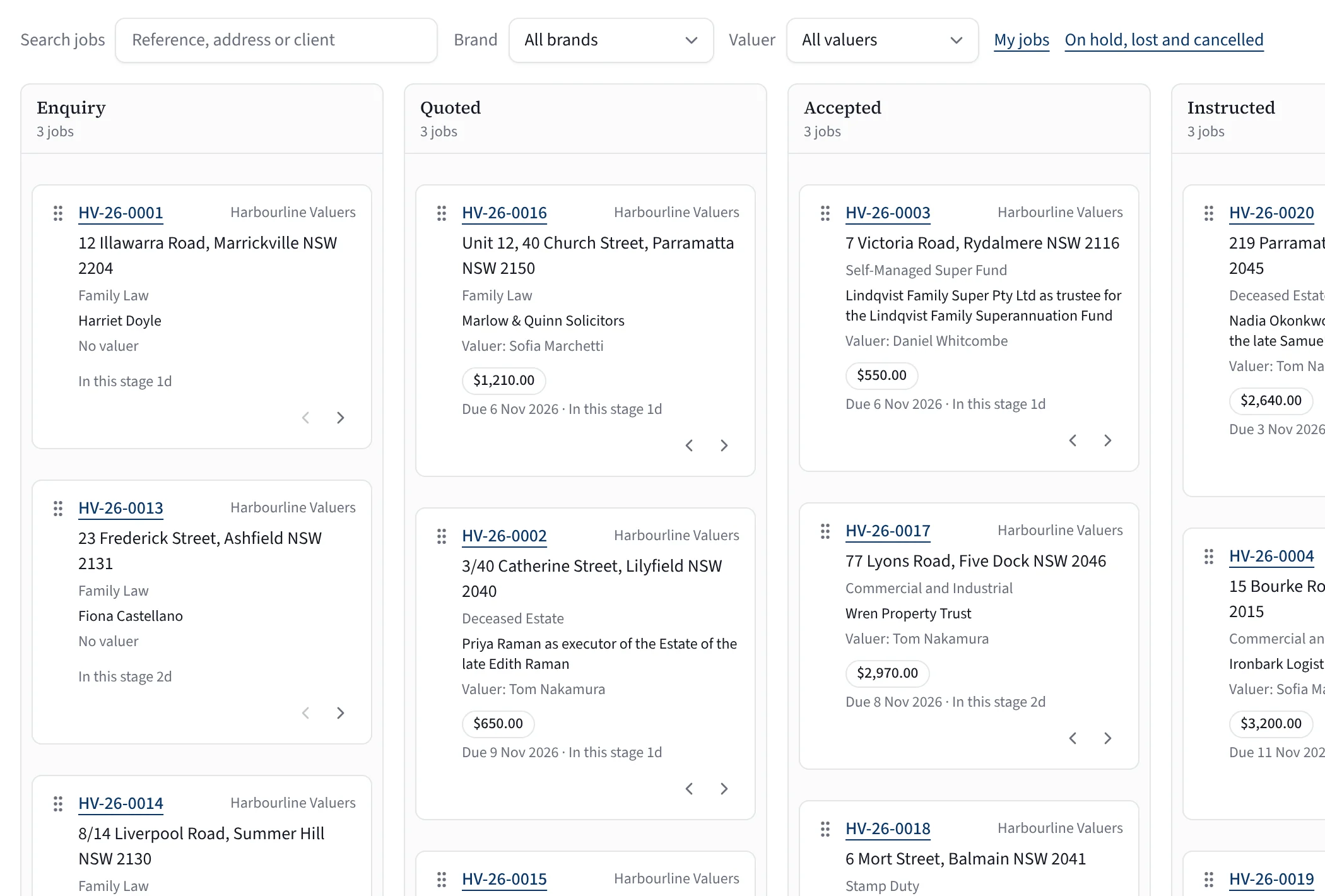
What to look at
- Search by reference, address or client
- Filter by brand and by valuer
- Move a card on or back with its arrows
- Due date and time in stage on every card
A real screen from Valufield, shown with an invented firm. Nothing is mocked up.
The job, at a glance.
Nine stages: enquiry, quoted, accepted, instructed, facts (the valuer confirms the property facts), draft, check, review and released.
Stage and time in it
Each column is a stage, and each card says how long the job has sat there.
Due date and fee
The due date, and the quoted fee once there is one.
Court work marked
Court and tribunal jobs carry their own badge on the card.
Moves follow the rules.
The board uses the same rules as the job itself, so a card cannot skip a step the job has not met.
Move a card
Drag it, use its arrows, or pick it up with the keyboard and press Space to drop it.
The rules are checked
Each move is checked against the job’s gates (what the stage needs, such as no BLOCK from the checker before review) on the server, and the database refuses it too.
A refusal says why
If a job cannot move yet, the board says what is missing and the card goes back. A job is released only from its release screen.
The rest of your week.
My jobs and unassigned
Your own jobs, jobs with no valuer yet, and jobs on hold, lost or cancelled are one click away.
Past jobs, off the board
History imported from a CSV or spreadsheet sits under Past jobs, not on the live board.
Sample jobs to try
Load a set of fictional sample jobs, at every stage, to see the board work before your own jobs go in.
Your week on the dashboard
Jobs due this week, inspections today and tomorrow, reviews waiting and releases waiting on payment.
Straight answers.
What are the stages?
Enquiry, quoted, accepted, instructed, facts, draft, check, review and released. Jobs on hold, lost or cancelled sit in their own view.
Can anyone move a job anywhere?
No. Each move is checked against the job’s gates, on the server and in the database, and a released job changes only through its release screen.
Can we see one brand’s jobs on their own?
Yes. Filter the board by brand, by valuer, or both.
How does a job get onto the board?
Press New job. Once your mailbox is connected, Build quote can also start a job from an enquiry email, filling in the address, purpose, client and date. Mailbox connections to Outlook and Gmail are not live yet. Past jobs import separately, under Past jobs.
Who can see which jobs?
People whose role lets them read jobs see the firm’s jobs, and My jobs shows your own. Your firm decides the roles.
Can we rename or add stages?
No. The nine stages are fixed in the database, so each stage’s gates mean the same thing on every job.
See it on a job like yours.
Tell us about your firm and we will show you Valufield on your kind of work, including what is released today and what is still in build. The form takes about a minute, and a person replies.
- We reply to arrange a time.
- We walk through the product on your kind of work.
- You decide, with no obligation.
Rather email? support@valufield.com.au